


 BlueberryAlien
I dont know what to do. It sounds fine then become muffled randomly. Not it's not a CPU issue I have a brand new Dell 16 Plus. Im using a FLX10. My gear is high tier. So then what is it??
Posted Sat 14 Feb 26 @ 6:19 pm
 djcel
djcel
Asio drivers ?
Which build of VirtualDJ?
Which version of Windows?
What is the latency / sound buffer size you selected?
Which build of VirtualDJ?
Which version of Windows?
What is the latency / sound buffer size you selected?
Posted Sat 14 Feb 26 @ 6:33 pm
BlueberryAlien
Asio drivers ? Realtek(R) audio. Up to date
Which build of VirtualDJ? v2026 b9005
Which version of Windows? Windows 11 Pro
What is the latency / sound buffer size you selected? 256 samples/ 5.8 ms
Which build of VirtualDJ? v2026 b9005
Which version of Windows? Windows 11 Pro
What is the latency / sound buffer size you selected? 256 samples/ 5.8 ms
Posted Sat 14 Feb 26 @ 7:37 pm
 locoDog
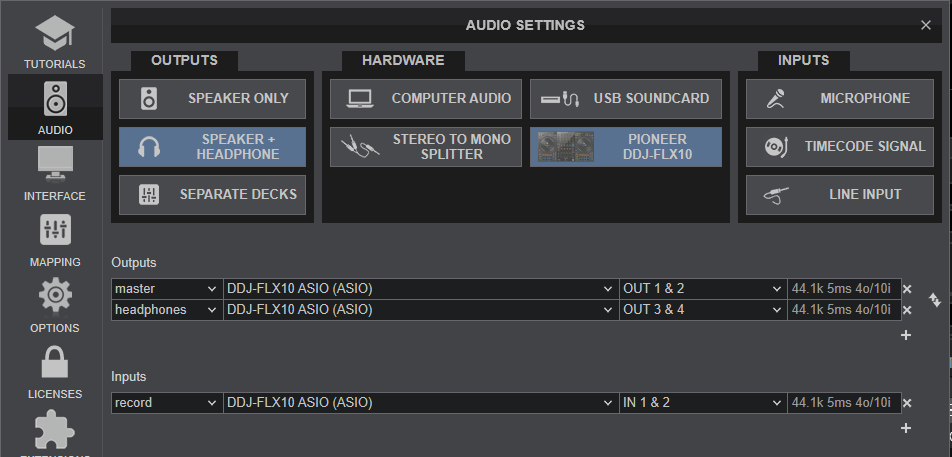
sound config should be as follows, realtec isn't asio, it's default hardware driver for the laptop
Posted Sat 14 Feb 26 @ 7:43 pm
 groovindj
On the djay Pro forum they do actually have a pre-filled section for when people post - and it rarely gets used properly. They either don't give the info at all, or they enter the wrong info etc.
Posted Sat 14 Feb 26 @ 7:58 pm
BlueberryAlien
Well. My sound config is the same.
Posted Sat 14 Feb 26 @ 9:08 pm
 kradcliffe
I just sold my FLX10 the other day but up to that point I had no issues whatsoever using VDJ with the Pioneer ASIO drivers.
Make sure they are not selected as the default sound card in Windows when active.
Make sure they are not selected as the default sound card in Windows when active.
Posted Sun 15 Feb 26 @ 12:05 am