


 locoDog
Thing I'm building

no prizes for prettiness but it's the mechanics that are the big thing,
120 assignable buttons for genre
120 buttons for user 1
120 same for user 2 and 120 comment,
Appends tags comma separated. doesn't comma an empty tag
40 step undo memory, that took some iterations
decks 1-4 and browser.
scroller to tag entire albums/folders with a string of tags
Filter builder for 4 tags and some bpm & key stuff
filter builder has undo memory
A few ideas yet and plenty of stuff to do but a nice day or so and the main mechanics are working well.
Anybody up for point & click tagging when it's near done? I've probably tagged more in the last 8 hours than I have done last year because it's so easy.
no prizes for prettiness but it's the mechanics that are the big thing,
120 assignable buttons for genre
120 buttons for user 1
120 same for user 2 and 120 comment,
Appends tags comma separated. doesn't comma an empty tag
40 step undo memory, that took some iterations
decks 1-4 and browser.
scroller to tag entire albums/folders with a string of tags
Filter builder for 4 tags and some bpm & key stuff
filter builder has undo memory
A few ideas yet and plenty of stuff to do but a nice day or so and the main mechanics are working well.
Anybody up for point & click tagging when it's near done? I've probably tagged more in the last 8 hours than I have done last year because it's so easy.
Posted 7 days ago @ 4:37 am
 the SOUND INSURGENT
Id give it a try.
A little different from my work flow as I bulk tag everything but yeah Ill give it a go.
A little different from my work flow as I bulk tag everything but yeah Ill give it a go.
Posted 7 days ago @ 11:18 am
 wickedmix
looks useful is it a skin or some kind of add on?
Posted 7 days ago @ 11:47 am
locoDog
it's a skin, it sits at exact size of default 2 deck layout so you can swap between decks and tagging with a button with no skin reload that's the convenience.
It's never going to be a skin release as it just my forever WIP skin under there.
it's not the looks, it the mechanics
I'm building it in a way that any skinner can drag and drop into their skin, all the mechanics are hidden away.
All the complicated bits are just written once and don't need to be touched or copied
they just panel the main body of their skin, then design a new grid to look pretty and fit a new body sized panel, mostly column typing.
Just got the smart brackets bit down, can't close a bracket if a bracket isn't open,
can't try use a filter if a bracket is open
bracket states saved in undo history
It's never going to be a skin release as it just my forever WIP skin under there.
it's not the looks, it the mechanics
I'm building it in a way that any skinner can drag and drop into their skin, all the mechanics are hidden away.
All the complicated bits are just written once and don't need to be touched or copied
they just panel the main body of their skin, then design a new grid to look pretty and fit a new body sized panel, mostly column typing.
Just got the smart brackets bit down, can't close a bracket if a bracket isn't open,
can't try use a filter if a bracket is open
bracket states saved in undo history
Posted 6 days ago @ 9:51 pm
 djjoe21
Looks interesting I'd give it a try.
Posted 5 days ago @ 11:47 pm
 GuiYeYDJ
Yes i would try it, maybe be a way to finally tag all my tracks.
thank you
thank you
Posted 5 days ago @ 12:06 am
 PANOSV
i would give it a try also , looks very nice
Posted 5 days ago @ 9:24 am
locoDog

Getting on, I don't like the prelisten but it's there because it's expected

That filter was built in 7 button presses, the tags of the browsed song were lit up until I used the tags in the filter.
There's a tonne of fat finger protection in there, last pressed grid button can be undone just by pressing it again,
you can nuke all tags or nuke just one [single click] or edit a tag by text input [double click] all of it covered by the history, it takes a snapshot before changing anything [except colour and star rating, no need for that amount of hand holding]
A few key filters in there, direct key, up a 5th, adjacent on the camelot wheel , and diagonal on the camelot, then variations if you like to start from a pitched up perspective [like I do]
I'm almost on to thinking time.
If you said you were interested, have a think up what buttons you want, 120 per tag.
my tags might not make sense for you and my order would make it difficult to navigate
just jot some down in a list one per line, it doesn't have to be all 120 buttons or all 4 tags [genre, uaer1 user2 comment]
just enough to get you started, I can write a personal script for you to populate the buttons with your choices in alphabetical order
long term you'll edit in a structure that makes sense to you because alpha is slow once you have memory of similar together, like in alpha, east coast and west coast would be completely distant ends of the grid so it would make more sense to have them near the rap hiphop buttons
write the .txt like this
GENRES

house
techno
trance
...
etc

USER1

whatever words
you want
it's your tags
....

USER2
...


COMMENT
...
Nice formatted list like that it's a 2 minute job for me to make a script to populate the buttons, I can have np++ sort alphabetically
Posted 4 days ago @ 5:54 am
djjoe21
The more I see of this the better it gets. I really love the direction your going here. I put together a list for you.
Sorry don' t know how to post that text box that's in you msg
Sorry don' t know how to post that text box that's in you msg
GENRES

Dance
Top 40
Disco
Nu Disco
Motown
Oldies
Rock
Alternative
Emo
Tech House
Redrum
Reggae
Reggaton
Moombahton
R&B
Hip Hop
Bootleg
Country
EDM
Electro
Freestyle
Jersey Club
New Wave
...

USER1

#dirty
#wedance
#coporate
#singalong
#girls
#trans up
#trans down
#updated remix
#uptempo remix
#short edit
#quick hit
#sampled
#cover
#fun updeat
#not dirty
#mashup
#wordplay
....

USER2
#doors open
#wedding doors open
#early night
#filler
#wedding filler
#tik tok
#yacht rock
#wedding
...


COMMENT
...
I like to Keep this open as much as possible
Posted 4 days ago @ 1:46 pm
djjoe21
I edited the buttons of an old PhantomDJ prep skin (AI Helped) to make button. You can see in pic I used the top row for setting hot cues I use the most. What you doing now is similar but on major steroids. I like it.

Couple Beers on me.
Great Stuff
Thanks
Couple Beers on me.
Great Stuff
Thanks
Posted 4 days ago @ 1:54 pm
locoDog
summer beers received thanks :)
Yeah the self imposed brief is "what if info pane crawled out of the browser section."
and took over...
The difference between the casual user noticing a track can be edited from this nice looking info pane on the default browser[and the info pane does look pretty]
compared to the experienced reality of
"Tagging is a never ending unglamorous job I need to keep up with, and I'm adding 100 tracks a month, I want to do it with least pain possible"
Point & click will never be a replacement for meticulous taggers but for somebody who wants more tagging done with least effort [but still keeping it personally subjective and not a generic online look up] then it's my best guess at a solution.
[have you figured I have a lot of tagging to do...]
djjoe21 wrote :
What you doing now is similar but on major steroids.
Yeah the self imposed brief is "what if info pane crawled out of the browser section."
and took over...
The difference between the casual user noticing a track can be edited from this nice looking info pane on the default browser[and the info pane does look pretty]
compared to the experienced reality of
"Tagging is a never ending unglamorous job I need to keep up with, and I'm adding 100 tracks a month, I want to do it with least pain possible"
Point & click will never be a replacement for meticulous taggers but for somebody who wants more tagging done with least effort [but still keeping it personally subjective and not a generic online look up] then it's my best guess at a solution.
[have you figured I have a lot of tagging to do...]
Posted 3 days ago @ 4:33 pm
locoDog
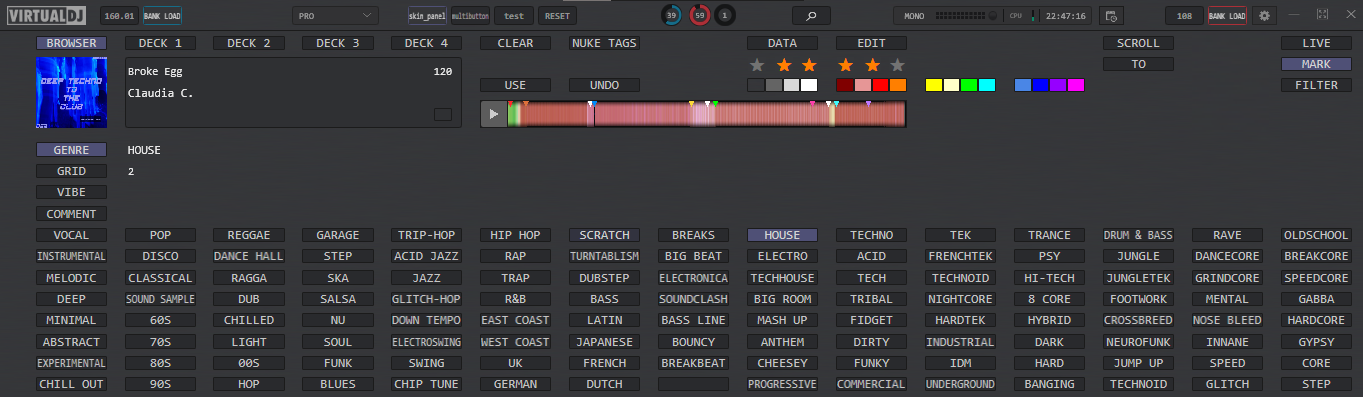
This is the main panel we'll go thru each element

top right corner,
live gets you back to decks
mark opens the marking panel [which we are looking at in the 1st pic]
filter opens the filter panel, which is discussed after

Top line left hand side
this is what source we will be marking
right click any of these and it will open the tag editor for that source
these buttons [excluding browser] are also drop zones, you can drag a track from the main browser or the album art on to a button and it will load on the corresponding deck

The 4 tag buttons
These are the tags we will be marking, your 2nd & 3rd will be named different but they are user1 & user2
left clicking selects the tag for writing
double click opens a popup that lets you type/edit the tag if there's something you want to manually type/delete
right clicking clears the tag [don't worry about fat finger]
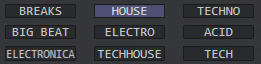
Some of the main buttons from the grid of 120
right clicking will let you change what the button saves and writes
left clicking will write to tag, if you left click by mistake you can click again and it will be removed from the tag [this remove function has only a one press memory]
If the button is lit up it means the word is in the tag and can't be written again.
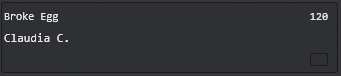
track data basics
artist, title remix, bpm, can't be edited, [just yet anyway]
the little square in the right corner is the track colour, clicking it opens a dialog box to manually enter a colour; default English like RED or you can use hex code #ff0000
this whole area is a dropzone to load a track to the corresponding deck
[if on browser it will load to deck 1]

rating & colour
furthest left star to give a zero rating
furthest left colour to remove colour

Nuke tags, does just that, it completely erases genre, user1, user2, and comment
don't panic about it, there's protection for the clumsy I'll mention in a minute

Data & edit
kind of like a grab feature
click data and the text on the button will become a '?'
When it's a '?' clicking any of the 120 grid buttons or any of the 4 tag buttons
What was held by the button pressed gets grabbed
the text on the data button will change again
now the edit button will allow you to edit the grabbed text
Even with the data button displaying the word "DATA" you can click edit to create a string

USE will use what is held by the data button and write to tag, not used often but there for those 1 off cases
UNDO
The fat finger protection
any time you write/delete/edit/nuke a tag, the system will take a snapshot of all 4 tags [genre,user1,user2, comment] before the change is made
so long as you don't edit another file you can undo all changes [40 step memory seems enough]

Clear, you won't use this much, it clears the undo history and clears the DATA button

Scroll & To
'here be dragons'
scroll will take whatever is on DATA button and scroll down the browser writing to every track until it hits the bottom
To is there if you only want to scroll a few tracks like say you're in a 30 track folder and the first 15 you want to tag as techno
first you'd get the word "techno" on to the data button
then you'd go to the 15th tracks, click the TO button
then take the browser scroll to the top of the browser and press SCROLL
There is no clumsy insurance for the scroll button, you can press it again quickly to stop it but it marks tracks at 30/second so use caution with it.
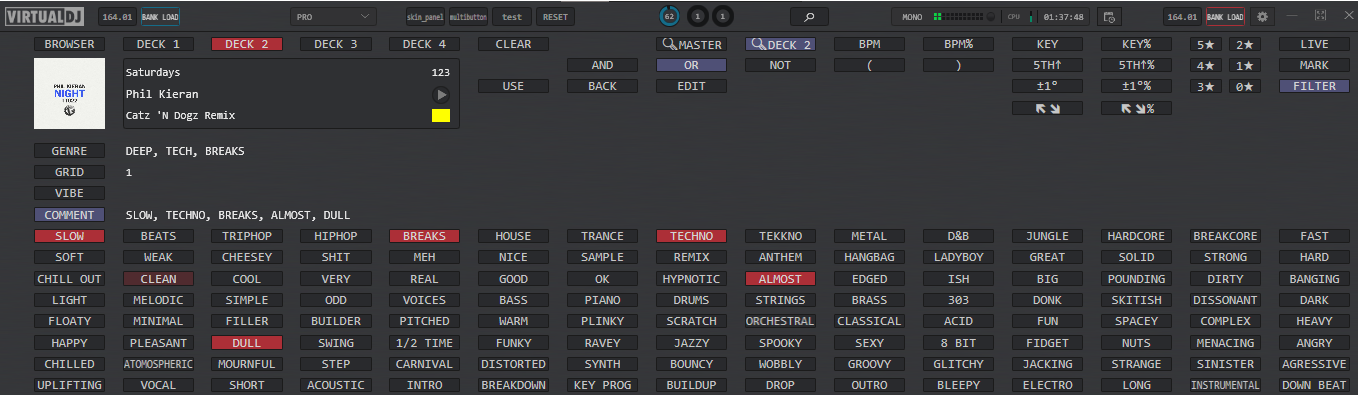
The filter page, not as serious as tagging but if you have done serious tagging then this will probably be useful

The logic buttons 'AND' 'OR' 'NOT'
One of AND OR should be lit up at all times, if they aren't click one [I'm not sure how that could happen, but it might.
with one of these on other button presses will work out
should I write ' & genre contains techno'
or should I write ' or genre contains techno'
the NOT button is an on/off switch to make the query negative
' & genre doesn't contain techno'

These two, on first start both will be off, only one can be on
when 'master' is on the 120 grid will light up any words that are found in the masterdeck [loudest deck] tag [whichever of the 4 tags we're focused on]
As you include these in your filter query the button lights will power down
handy to save you hunting for buttons.
the button that says 'deck 2' does the same thing but not masterdeck, but the deck designated as the source deck by the buttons above the track meta data mentioned at the start of this about filters

brackets, useful for combined filters
'genre contains house & ( genre contains handbag or genre contains vocal or genre contains soulful )
brackets keep a count of how many you have open, telling you how many you need to close to get a working filter

Buttons are smart enough to know,
if it should write ' & genre contains....' if in the middle of a set of queries.
or if it should write 'genre contains...' at the start of a query or next to an open bracket.

BPM will make you a filter of pitch difference <=5%
BPM% umm, I like to play tracks pitched, so a usual bpm filter would only really get me stuff that is a faster tempo but played nearer pitch neutral, not the vibe I want BPM% gets me pitch difference <=5% against absolute bpm then I can pitch up the new track just as much or close to it.
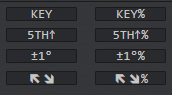
Whole lot of key filters
key direct key match
5th up a 5th +2 camelot users
1 degree +/-, basically adjacent on the camelot wheel 1a will return 12a, 2a & 1b
diagonal arrows, diagonal on the camelot wheel, 1a will return 12b & 2b
% variations, did I mention I like to play pitched up, same idea as bpm%

Star ratings because why not? not a rating user myself, context is too important to have just one measure of a track but it's there for those that do

Edit, you will have created a string and maybe there's something you want to manually type, maybe change an '&' to an 'or'
Use - actually use the filter you've created
it will type a * into search to get a database wide filter and apply the filter
you won't be able to use a filter if you have unclosed brackets [might auto close hanging brackets in next version]
BACK, again lovely fat finger protection, remembers upto 40 steps in creating your filter
this is a different memory to the marking memory

clear, like the clear in marking wipes the BACK memory and clears the string, also turns the filter off
I think I'm out of ideas for now, still a decent bit of tidying up the xml to do and that will give me some idea thinking time.
Then it'll be time to release it into the wild and find all the bits I'm blind to as I'm used to using it in one way.
Posted 3 days ago @ 2:05 am
GuiYeYDJ
Here is the text file for my tags.
I hope it works; let me know if anything needs changing.
I also wanted to ask if I need to modify a skin, or if using the custom buttons window found in some skins would suffice.
Thanks.
I hope it works; let me know if anything needs changing.
I also wanted to ask if I need to modify a skin, or if using the custom buttons window found in some skins would suffice.
Thanks.
GENRES

MAQUINA
MAKINA
BASES
POKY
HARDSTYLE
NEWSTYLE
HARDCORE
HAPPYHARDCORE
PROGRESIVO
CHOCOLATE
HARDHOUSE
HARDHOUSEAMERICANO
TECHNO
ACIDTECHNO
DANCE
EURO-DANCE
ITALO-DANCE
ROCKOLA
SPOOK
BUMPING
JUMPING
90S
2KS
2010S
2020S


USER1(GRID)
2D32
3D32
4D32
5D32
6D32
7D32
8D32
9D32
10D32
11D32
12D32
13D32
14D32
15D32


USER2(ENERGIAS)


ENTRADA
ENTRADAFULL
SUBIENDO LOW
SUBIENDO MED
SUBIENDO HARD
CLIMAX BASES
CLIMAX CANTADOS
CLIMAX RUTA
BAJANDO
BAJANDO 2
SALIENDO


COMMENT

RAP
NOVOCAL
CAMBIA VELOCIDAD
VOLVER A BUSCAR
PERFECTA
BAJA CALIDAD
BAJO VOLUMEN
NORMALIZADA
PIERDE GOLPES
1
2
3
4
AJUSTAR GRID
CAMPANAS
OSCURA
ALEGRE
TRISTE
MEN
WOMAN
Posted 4 hours ago
locoDog
@GuiYeYDJ List is good
I'm in the process of adding little bits here and there also final in house testing.
I added 8 custom colour buttons now and added some things to make it even quicker [like point and click is ok but some stuff a keyboard shortcut would be even quicker]
And all the shortcuts are super simple script like to go back in marking history it's just
multibutton markundo
And I've made sure that everything it does has a simple script like this
As for what you need to do, it's almost nothing
If you could send me a link to your usual skin in PM [even if it's default], I will see how it fits
the only thing you will need to do is use a custom button once, with a script I give you, that will put your list on the buttons [and then you can; change them / add to them /reorder them, after that]
I'm in the process of adding little bits here and there also final in house testing.
I added 8 custom colour buttons now and added some things to make it even quicker [like point and click is ok but some stuff a keyboard shortcut would be even quicker]
And all the shortcuts are super simple script like to go back in marking history it's just
multibutton markundo
And I've made sure that everything it does has a simple script like this
As for what you need to do, it's almost nothing
If you could send me a link to your usual skin in PM [even if it's default], I will see how it fits
the only thing you will need to do is use a custom button once, with a script I give you, that will put your list on the buttons [and then you can; change them / add to them /reorder them, after that]
Posted 3 hours ago